# Transit Gateway
## What is Transit Gateway
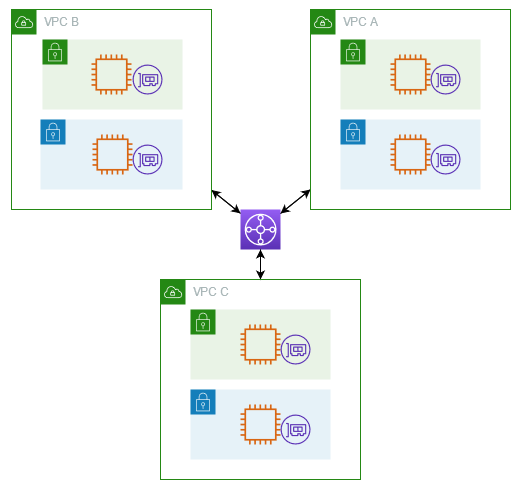
VPC Transit Gateway is a network transit hub used to interconnect virtual private clouds (VPCs) and on-premises networks. As your cloud infrastructure expands globally, inter-Region peering connects transit gateways together using the AWS Global Infrastructure. All network traffic between AWS data centers is automatically encrypted at the physical layer.
***
## Example Diagram Transit Gateway
Architecture
***
## What does Transit Gateway offer
* **Simplified Network Architecture**: Transit GW provides a centralized hub for connecting multiple VPCs, on-premises networks, and VPN connections. This simplification reduces the complexity of managing inter-VPC connectivity and routing configurations
* **Scalability**: Transit GW supports thousands of VPCs and handling large volumes of network traffic, This capability essential for organizations with growing (Scalable) infrastructure needs.
* **Transitive Routing**: Transit GW supports transitive (Multi) routing, enabling traffic to flow between any connected VPCs, even if they are not directly peered with each other. This capability simplifies network connectivity and eliminates the need of complexity
* **Centralized Route management**: Transit GW uses a centralized route table, providing control over how traffic is routed between connected VPCs and on-premises networks. This centralized management simplifies routing configuration and ensures consistent routing policies across the network.
* **Integration with VPN and Direct Connect**: Transit GW seamlessly integrates with VPN and AWS Direct Connect, enabling organizations to extend their on-premises network connectivity to multiple VPCs via a single gateway. This integration streamlines hybrid cloud deployments and facilitates secure connectivity between on-premises infrastructure and AWS resources.
Overall, TGW offers significant value by simplifying network connectivity, improving scalability, enhancing visibility and control, and reducing costs for organizations deploying complex network architectures within AWS
***
## Transit gateway concepts
* **TGW Route table**: A transit gateway has a default route table and can optionally have additional route tables. A route table includes dynamic and static routes that decide the next hop based on the destination IP address of the packet. The target of these routes could be any transit gateway attachment. By default, transit gateway attachments are associated with the default transit gateway route table.
* **TGW Attachment**: You can attach the following:
* One or more VPCs
* A Connect SD-WAN/third-party network appliance
* An AWS Direct Connect gateway
* A peering connection with another transit gateway
* A VPN connection to a transit gateway
* **TGW Associations**: Each attachment is associated with exactly one route table. Each route table can be associated with zero to many attachments.
* **TGW Route propagation**: Transit gateway route tables allows you to associate a table with a transit gateway attachment. VPC, VPN, Direct Connect gateway, Peering, and Connect attachments are all supported. When associated, routes for these attachments are propagated from the attachment to the target transit gateway route table. An attachment can be propagated to multiple route tables.