# Deploying a Secure Django App on AWS ECS Using Terraform and GitHub Actions

## **The Problem We’re Solving**

In modern DevOps, deploying applications securely is **non-negotiable**—especially when dealing with production workloads.

But here’s the problem:\
**Most ECS tutorials focus on “how to deploy fast” instead of “how to deploy securely.”**

This project **intentionally takes the security-first path**, accepting some additional cost and complexity to achieve:

* Private networking for containers
* Secure image pulls without exposing the VPC to the public internet
* Encrypted, managed databases
* Clear separation between **DevOps automation** and **runtime operations**

That’s the problem this project solves.

***

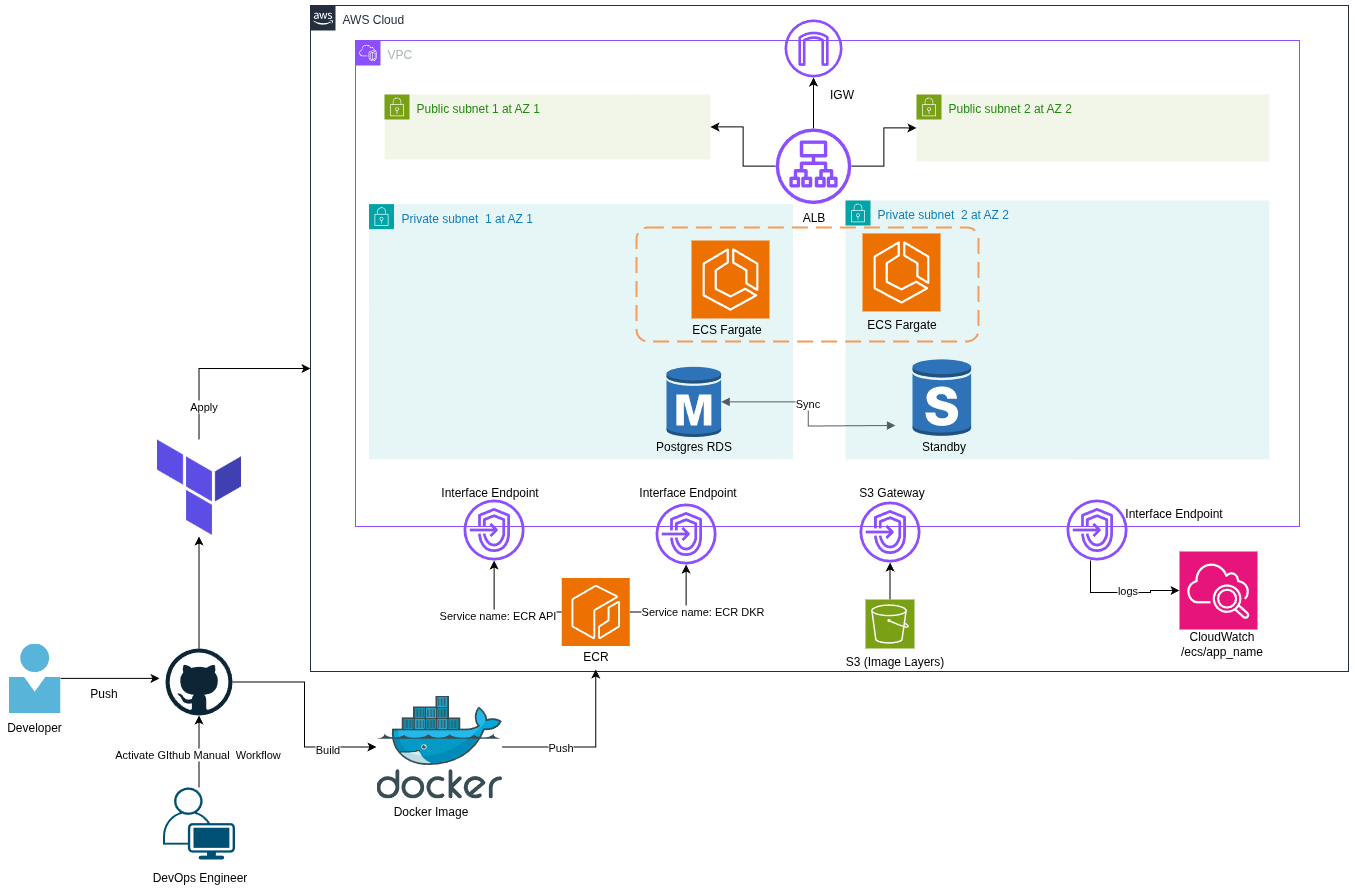
## Architecture Explained

### **High-Level Overview**

| **Django App (Dockerized)**         | The application                            |
| ----------------------------------- | ------------------------------------------ |
| **Terraform**                       | Infrastructure as Code (IaC)               |
| **ECS Fargate**                     | Serverless container orchestration         |
| **RDS (PostgreSQL)**                | Managed database                           |
| **ALB (Application Load Balancer)** | Frontend routing                           |
| **VPC Endpoints (Interface)**       | Private networking for ECR, S3, CloudWatch |
| **CloudWatch Logs**                 | Centralized logging                        |
| **GitHub Actions**                  | CI/CD pipeline                             |
| **Docker + ECR**                    | Container image build & storage            |

***

### Architecture Diagram

<figure><img src="https://401929978-files.gitbook.io/~/files/v0/b/gitbook-x-prod.appspot.com/o/spaces%2F8Kcf9eeQqbuAAGUn7HDN%2Fuploads%2FNHR1w8To9RMqiLoczOLb%2FArchitecture.png?alt=media&#x26;token=e49b8e87-afb2-4568-a108-af3fc5b9c31b" alt=""><figcaption></figcaption></figure>

***

### File Structure Overview

```bash
.
├── app                # Django Application
│   ├── dockerfile
│   ├── entrypoint.sh
│   └── hello_world_django_app
├── infrastructure     # Terraform IaC
│   ├── main.tf
│   └── modules
│       ├── computes
│       └── subnets
├── .github/workflows  # Github Action Workflow
└── README.md

```

### **Workflow Breakdown**

| **Build**          | Docker image creation          |
| ------------------ | ------------------------------ |
| **Push**           | Push image to **ECR**          |
| **Infrastructure** | Terraform apply ECS, RDS, ALB  |
| **Deploy**         | ECS pulls image and serves app |
| **Destroy**        | Optional cleanup step          |
| **Exit**           | Workflow cancellation          |

***

### Explanation of the Chosen Services

| **ECS Fargate**                                    | <p><strong>Security</strong>: No SSH, runs in private subnet, AWS-managed runtime. <br><strong>Cost</strong>: Pay per vCPU and memory; slightly more expensive for long-running tasks than EC2.<br><strong>HA</strong>: Automatically spans multiple AZs. <strong>Complexity</strong>: Easier to operate but less control over OS-level configs.</p>                                       |
| -------------------------------------------------- | ------------------------------------------------------------------------------------------------------------------------------------------------------------------------------------------------------------------------------------------------------------------------------------------------------------------------------------------------------------------------------------------ |
| **Application Load Balancer (ALB)**                | <p><strong>Security</strong>: Terminates HTTPS, handles SSL/TLS certificates securely. <br><strong>Cost</strong>: \~$18–$20/month base + traffic costs. <br><strong>HA</strong>: Regional service, auto-scales and load balances across AZs. </p><p><strong>Complexity</strong>: Adds config overhead if using path-based routing or multiple target groups.</p>                           |
| **VPC with Public/Private Subnets**                | <p><strong>Security</strong>: Public ALB, private ECS tasks & RDS. Minimizes surface area. <br><strong>Cost</strong>: No direct cost, but subnet design affects resource placement and networking choices. <br><strong>HA</strong>: Subnets in multiple AZs for failover. <strong>Complexity</strong>: More complex Terraform code; requires careful design to avoid misconfiguration.</p> |
| **VPC Endpoints (S3, ECR, Logs, Secrets Manager)** | **Security**: Keeps traffic private; no internet exposure for pulls/logs. **Cost**: \~$7.3/month per interface endpoint (e.g., 4 endpoints = \~$29.2). **HA**: Requires per-AZ deployment for true HA. **Complexity**: Each service needs a separate endpoint; setup can get messy fast.                                                                                                   |
| **Amazon RDS (PostgreSQL Multi-AZ)**               | <p><strong>Security</strong>: Encrypted at rest & in transit; runs in private subnet.<br><strong>Cost</strong>: \~$30–$40/month for dev size; production costs much higher.<br><strong>HA</strong>: Multi-AZ failover, automated backups. <strong>Complexity</strong>: No OS-level access; bound to AWS maintenance windows.</p>                                                           |
| **CloudWatch Logs (via VPC Endpoint)**             | <p><strong>Security</strong>: Logs sent privately via VPC endpoint.<br><strong>Cost</strong>: \~$7.3/month for endpoint + $0.50/GB logs.<br><strong>HA</strong>: AWS-managed; no single point of failure.<strong>Complexity</strong>: Needs careful retention management or costs can spiral.</p>                                                                                          |

***

## Code Explanation

### Containerize Django App

**App File structure**

```bash
├── app                # Django Application
│   ├── .dockerignore
│   ├── requirement.txt
│   ├── dockerfile
│   ├── entrypoint.sh
│   └── hello_world_django_app
```

In `./dockerfile` section:

```dockerfile
# Stage 1: Build dependencies and install Python packages
FROM python:3.11-slim as builder

WORKDIR /app

# Install build dependencies only in builder stage
RUN apt-get update && apt-get install -y gcc libpq-dev netcat-openbsd && \
    apt-get clean && rm -rf /var/lib/apt/lists/*

COPY requirements.txt .

# Install dependencies into a specific directory to copy later
RUN pip install --no-cache-dir --prefix=/install -r requirements.txt

COPY . .

# Stage 2: Runtime minimal image
FROM python:3.11-slim

WORKDIR /app

# Copy only the installed packages from builder
COPY --from=builder /install /usr/local

# Copy the application source code
COPY --from=builder /app .

EXPOSE 80

RUN chmod +x ./entrypoint.sh

ENTRYPOINT ["./entrypoint.sh"]
```

Started To copy important files and install the right dependencies that application need to work.

Used `Slim` distro and `Multi-stage` to tried to minimize the use of the `RUN & COPY` command so i make less layers in the Image.

In `ENTRYPOINT` Used Script that will run the App right.

In `./entrypoint.sh` section:

```bash
#!/bin/sh

echo "Applying database migrations..."
python manage.py migrate

echo "Creating superuser if not exists..."
echo "from django.contrib.auth import get_user_model; \
User = get_user_model(); \
User.objects.filter(username='admin').exists() or \
User.objects.create_superuser('admin', 'admin@example.com', 'adminpass')" | python manage.py shell

echo "Starting server..."
exec gunicorn hello_world_django_app.wsgi:application --bind 0.0.0.0:80

```

Commands that the app need after communicate with Dev Team.

{% hint style="info" %}
In the Creating user is for testing prupose
{% endhint %}

***

### Infrastructure Using Terraform

**Infrastructure File structure**

```bash
├── infrastructure  
│   ├── main.tf  
│   ├── modules  
│   │   ├── computes  
│   │   │   ├── main.tf  
│   │   │   ├── output.tf  
│   │   │   └── variable.tf  
│   │   └── subnets  
│   │       ├── main.tf  
│   │       ├── output.tf  
│   │       └── variables.tf  
│   ├── output.tf  
│   ├── provider.tf  
│   ├── terraform-dev.tfvars  
│   ├── terraform-prod.tfvars  
│   └── variables.tf
```

**Modules**

**Subnets**

Anything I use in `VPC` Network is in this Directory/Folder.

In `subnets/variables.tf` section:

```hcl
variable "vpc_id" {}
variable "vpc_cidr" {}
variable "subnet_az" {
  type = list(string)
}
variable "env" {}
variable "region" {}
variable "vpc_endpoint_sg" {
  type = string
}
```

This is all variable that subnets need to work.

In subnets/main.tf Section:

```hcl
# Public Subnets Configuration
resource "aws_subnet" "public_subnet" {
  count                   = 2
  vpc_id                  = var.vpc_id
  cidr_block              = cidrsubnet(var.vpc_cidr, 4, count.index)
  availability_zone       = var.subnet_az[count.index]
  tags = {
    Name = "${var.env}-public-subnet-${count.index}"
  }
}

# Private Subnet Configuration
resource "aws_subnet" "private_subnet" {
  count               = 2
  vpc_id              = var.vpc_id
  cidr_block          = cidrsubnet(var.vpc_cidr, 4, count.index + 2)
  availability_zone   = var.subnet_az[count.index]
  tags = {
    Name = "${var.env}-private-subnet-${count.index}"
  }
}
```

Configured 4 Subnets

* 2 Public Subnets
* 2 Private Subnets

Used `Count` so i can repeat the creation of Subnet Twice, also Used `cidrsubnet()`&#x20;

```hcl
# Endpoints Configuration
resource "aws_vpc_endpoint" "ecr_dkr" {
  vpc_id       = var.vpc_id
  service_name = "com.amazonaws.${var.region}.ecr.dkr"
  vpc_endpoint_type = "Interface"
  subnet_ids        = aws_subnet.private_subnet[*].id
  private_dns_enabled = true
  security_group_ids = [var.vpc_endpoint_sg]
  tags = {
    Name = "${var.env}-ecr-endpoint-data-plane"
  }
}

resource "aws_vpc_endpoint" "ecr_api" {
  vpc_id       = var.vpc_id
  service_name = "com.amazonaws.${var.region}.ecr.api"
  vpc_endpoint_type = "Interface"
  subnet_ids        = aws_subnet.private_subnet[*].id
  private_dns_enabled = true
  security_group_ids = [var.vpc_endpoint_sg]


  tags = {
    Name = "${var.env}-ecr-endpoint-control-plane"
  }
}

resource "aws_vpc_endpoint" "s3_gateway" {
  vpc_id            = var.vpc_id
  service_name      = "com.amazonaws.${var.region}.s3"
  vpc_endpoint_type = "Gateway"
  route_table_ids = [aws_route_table.private_rtb.id]

  tags = {
    "Name" = "${var.env}-s3-gateway"
  }
}

resource "aws_vpc_endpoint" "cloudwatch_logs" {
  vpc_id            = var.vpc_id
  service_name      = "com.amazonaws.${var.region}.logs"
  vpc_endpoint_type = "Interface"
  subnet_ids        = aws_subnet.private_subnet[*].id
  private_dns_enabled = true
  security_group_ids = [var.vpc_endpoint_sg]
}

```

Configured 4 Endpoints

* 3 Interface endpoint (ECS dkr, ECS API, CloudWatch Logs)
  * DKR => for Push/Pull Image Predefined URL from ECR
  * API => for ECS To request Tokens from ECR
  * Logs => for troubleshooting if there is any error in the ECS Image after pull
* 1 Gateway (S3)
  * S3 => for ECS so it can request the Layers after taking the Predefined URL from the ECR

Used `vpc_id` , `region` , and `vpc_endpoint_sg` as Variable because they fill by the `root/main.tf`&#x20;

<pre class="language-hcl"><code class="lang-hcl"><strong># Public Route Table Configuration
</strong>resource "aws_route_table" "public_rtb" {
  vpc_id       = var.vpc_id
  route {
    cidr_block = "0.0.0.0/0"
    gateway_id = aws_internet_gateway.igw.id
  }
  tags = {
    Name = "${var.env}-public-rtb"
  }
}

resource "aws_route_table_association" "public_subnet_assoc" {
  count          = 2
  subnet_id      = aws_subnet.public_subnet[count.index].id
  route_table_id = aws_route_table.public_rtb.id
}


# Private Subnet Route table Configuration
resource "aws_route_table" "private_rtb" {
  vpc_id       = var.vpc_id
  tags   = {
    Name = "${var.env}-private-rtb"
  }
}

resource "aws_route_table_association" "private_subnet_assoc" {
  count          = 2
  subnet_id      = aws_subnet.private_subnet[count.index].id
  route_table_id = aws_route_table.private_rtb.id
}

</code></pre>

Configured Two Route table

* One Public Route table
* One Private Route table

Used Public Route table to connect to Public subnet and  when configure Application Load balancer the users can  access it via Internet gateway.

Used Private Route table to connect  Private subnet so I can secure the ECS and RDS DB.

```hcl
# Accessing our network Using IGW
resource "aws_internet_gateway" "igw" {
  vpc_id = var.vpc_id
  tags = {
    Name = "${var.env}-igw"
  }
}

```

Configured One Internet Gateway

Used Internet Gateway, so User can access the Application through it.

In `subnets/output.tf` section:

```hcl
output "public_subnet_1" {
  value = aws_subnet.public_subnet[0]
}

output "public_subnet_2" {
  value = aws_subnet.public_subnet[1]
}

output "private_subnet_1" {
  value = aws_subnet.private_subnet[0]
}

output "private_subnet_2" {
  value = aws_subnet.private_subnet[1]
}
```

the output that I will pass it to other services

***

**Computes**

Anything I use in `computes` Services is in this Directory/Folder.

In `computes/variable.tf`

```hcl
variable "repo_name" {}
variable "cluster_name" {}
variable "network_mode" {}
variable "cluster_region" {}
variable "ecs_type" {}
variable "memory_size" {}
variable "cpu_size" {}
variable "container_port" {}
variable "host_port" {}
variable "env" {}
variable "desired_containers" {}
variable "public_ip" {}
variable "vpc_id" {}
variable "db_name" {}
variable "db_username" {}
variable "db_password" {}
variable "db_endpoint" {}
variable "db_port" {}
variable "service_subnets" {
  type = list(string)
}
variable "service_security_groups" {
  type = list(string)
}

variable "alb_target_type" {}
variable "alb_subnets" {
  type = list(string)
}
variable "alb_security_groups" {
  type = list(string)
}
```

This is all variable that ECS need to work.

In `computes/main.tf` section:

```hcl
# ECR 
resource "aws_ecr_repository" "my-app" {
  name = var.repo_name
}
```

Configured ECR  with Dynamic name and pass it when i need it in other service.

```hcl

# ECS Configurations 
resource "aws_ecs_cluster" "ecs_cluster" {
  name = var.cluster_name
}

resource "aws_ecs_service" "my_app_service" {
  name            = "${var.cluster_name}-service"
  cluster         = aws_ecs_cluster.ecs_cluster.id
  task_definition = aws_ecs_task_definition.my_app_task.arn
  launch_type     = "${var.ecs_type}"
  desired_count   = var.desired_containers
  depends_on = [
    aws_iam_role_policy_attachment.ecs_execution_role_policy,
    aws_iam_role_policy_attachment.ecs_execution_ecr_vpc_attach,
    aws_iam_policy_attachment.ecs_task_s3_attach,
    aws_lb_listener.ecs_alb_listener
  ]
  load_balancer {
    target_group_arn = aws_lb_target_group.ecs_tg.arn
    container_name   = "${var.repo_name}"
    container_port   = var.container_port
  }
  network_configuration {
    subnets          = var.service_subnets
    security_groups  = var.service_security_groups
    assign_public_ip = var.public_ip
  }
  
}

```

Created ECS Cluster, and ECS Service

```hcl
# ECS Task Definition Configuration
data "aws_caller_identity" "current" {} # to get your Account ID 
resource "aws_ecs_task_definition" "my_app_task" {
  family                   = "${var.cluster_name}_task"
  requires_compatibilities = ["${var.ecs_type}"]
  network_mode             = var.network_mode
  cpu                      = var.cpu_size
  memory                   = var.memory_size
  execution_role_arn       = aws_iam_role.ecs_task_execution_role.arn
  task_role_arn            = aws_iam_role.ecs_task_role.arn
  container_definitions = jsonencode([
    {
      name      = "${var.repo_name}"
      image     = "${data.aws_caller_identity.current.account_id}.dkr.ecr.${var.cluster_region}.amazonaws.com/${aws_ecr_repository.my-app.name}:latest"
      essential = true
        environment = [
        {
          name  = "POSTGRES_DB"
          value = var.db_name
        },
        {
          name  = "POSTGRES_USER"
          value = var.db_username
        },
        {
          name  = "POSTGRES_HOST"
          value = var.db_endpoint
        },
        {
          name  = "POSTGRES_PORT"
          value = tostring(var.db_port)
        },
        {
          name      = "POSTGRES_PASSWORD"
          value = var.db_password
        }
      ]
      portMappings = [
        {
          containerPort = var.container_port
          hostPort      = var.host_port
        }
      ]
      logConfiguration = {
          logDriver = "awslogs"
          options = {
            awslogs-group = "/ecs/${var.repo_name}"
            awslogs-region        = "${var.cluster_region}"
            awslogs-stream-prefix = "ecs"
          }
       }
    }
  ])
  
  depends_on = [ aws_ecr_repository.my-app ]
}

resource "aws_cloudwatch_log_group" "ecs_logs" {
  name              = "/ecs/${var.repo_name}"
  retention_in_days = 7
}
```

Used `data aws_caller_identity{}` to get the  Account ID, the uses of it when you have a Cross-account ECR.&#x20;

Used `aws_ecs_task_definition` to set up the Container settings like what cluster it will be in it,  resources need it, IAM, Image URL, and finally environment variable or Secrets of the app in the image.&#x20;

{% hint style="danger" %}
The ECS task definition depends on the ECR repository to get the image URL, which is why `aws_ecs_task_definition` cannot be created before the ECR repository is initialized.
{% endhint %}

Used `aws_cloudwatch_log_group` to get logs of the images.

```hcl
# IAM Role Configuration
resource "aws_iam_role" "ecs_task_execution_role" {
  name = "${var.env}-ecs-task-execution-role"

  assume_role_policy = jsonencode({
    Version = "2012-10-17",
    Statement = [{
      Effect = "Allow",
      Principal = {variable "environment" {
  description = "The environment for the resources"
  type        = string
  default     = "dev"
}

variable "cidr_block" {
  description = "The CIDR block for the Network"
  type = list(object({
    name = string
    cidr = string
  }))
}

variable "az" {
  description = "The Availability Zone for the Subnet"
  type        = list(string)
}

variable "region" {
  description = "The Region that i will implement my Infra in AWS"
  default     = "us-east-1"
}

variable "container_port" {}
variable "cpu" {}
variable "memory" {}

variable "db_master_password" {
  description = "Master password for RDS"
  type        = string
  sensitive   = true
}
variable "image_name" {
  description = "Contains the image name"
  type = string
}

        Service = "ecs-tasks.amazonaws.com"
      },
      Action = "sts:AssumeRole"
    }]
  })

  tags = {
    Name = "${var.env}-ecs-task-execution-role"
  }
}

resource "aws_iam_role_policy_attachment" "ecs_execution_role_policy" {
  role       = aws_iam_role.ecs_task_execution_role.name
  policy_arn = "arn:aws:iam::aws:policy/service-role/AmazonECSTaskExecutionRolePolicy"
}

resource "aws_iam_policy" "ecs_execution_ecr_vpc_policy" {
  name = "${var.env}-ecs-execution-ecr-vpc-policy"
  policy = jsonencode({
    Version = "2012-10-17",
    Statement = [
      {
        Effect = "Allow",
        Action = [
          "ecr:GetDownloadUrlForLayer",
          "ecr:BatchGetImage",
          "ecr:GetAuthorizationToken",
          "ecr:BatchCheckLayerAvailability",
          "secretsmanager:GetSecretValue",
          "kms:Decrypt",
          "logs:CreateLogStream",
          "logs:PutLogEvents"
        ],
        Resource = "*"
      }
    ]
  })
}

resource "aws_iam_role_policy_attachment" "ecs_execution_ecr_vpc_attach" {
  role       = aws_iam_role.ecs_task_execution_role.name
  policy_arn = aws_iam_policy.ecs_execution_ecr_vpc_policy.arn
}

resource "aws_iam_role" "ecs_task_role" {
  name = "${var.env}-ecs-task-role"

  assume_role_policy = jsonencode({
    Version = "2012-10-17",
    Statement = [{
      Effect = "Allow",
      Principal = {
        Service = "ecs-tasks.amazonaws.com"
      },
      Action = "sts:AssumeRole"
    }]
  })

  tags = {
    Name = "${var.env}-ecs-task-role"
  }
}

resource "aws_iam_policy" "ecs_task_s3_policy" {
  name        = "${var.env}-ecs-task-s3-policy"
  description = "Policy for ECS tasks to access S3 bucket"
  policy = jsonencode({
    Version = "2012-10-17",
    Statement = [
      {
        Effect = "Allow",
        Action = [
          "s3:GetObject",
          "s3:ListBucket"
        ],
        Resource = ["*"]
      }
    ]
  })
}

resource "aws_iam_policy_attachment" "ecs_task_s3_attach" {
  name       = "${var.env}-ecs-task-s3-attach"
  roles      = [aws_iam_role.ecs_task_role.name]
  policy_arn = aws_iam_policy.ecs_task_s3_policy.arn
}

```

Used `"aws_iam_role" "ecs_task_execution_role"`  to tell which service could use this policies that i will attach to it later.

{% hint style="info" %}
Created `aws_iam_role` twice because it's the best practice of AWS to make this, as AWS says -> **Split execution role and task role** to enforce least privilege.
{% endhint %}

In `ecs_execution_role_policy` starts to attach the Policies that the ECS will need for Pull,Push, Authorization, and etc...

In `ecs_task_s3_policy` from the name its obvious what it will do, as it will Get/List objects from S3, in the ECS it will Get the Image Layer.

```hcl
# ALB 
resource "aws_lb" "ecs_alb" {
  name                       = "ecs-alb"
  internal                   = false
  load_balancer_type         = "application"
  security_groups            = var.alb_security_groups
  subnets                    = var.alb_subnets
  enable_deletion_protection = false

  tags = {
    Name = "ecs-alb"
  }
}

resource "aws_lb_target_group" "ecs_tg" {
  name        = "ecs-target-group"
  port        = 80 # default port to the audience
  protocol    = "HTTP"
  target_type = "${var.alb_target_type}"
  vpc_id      = var.vpc_id

  health_check {
    path     = "/"
    protocol = "HTTP"
    port     = 80
  }
}

resource "aws_lb_listener" "ecs_alb_listener" {
  load_balancer_arn = aws_lb.ecs_alb.arn
  port              = 80
  protocol          = "HTTP"

  default_action {
    type             = "forward"
    target_group_arn = aws_lb_target_group.ecs_tg.arn
  }
}

```

Used `aws_lb` to create ALB. Used `aws_lb_target_group` to target the ECS with the port dynamic port with the container.

In `computes/output.tf` section:

```hcl
output "ecr_repo_url" {
  value = aws_ecr_repository.my-app.repository_url
}

```

Finally, Used output block `ecr_repo_url`  to get ECR URL to pass it to other service.

***

#### Root Configurations

Let's get out of Modules thing and Integrate every configuration we did.

In `./variable.tf`  section:

```hcl
variable "environment" {
  description = "The environment for the resources"
  type        = string
  default     = "dev"
}

variable "cidr_block" {
  description = "The CIDR block for the Network"
  type = list(object({
    name = string
    cidr = string
  }))
}

variable "az" {
  description = "The Availability Zone for the Subnet"
  type        = list(string)
}

variable "region" {
  description = "The Region that i will implement my Infra in AWS"
  default     = "us-east-1"
}

variable "container_port" {}
variable "cpu" {}
variable "memory" {}

variable "db_master_password" {
  description = "Master password for RDS"
  type        = string
  sensitive   = true
}
variable "image_name" {
  description = "Contains the image name"
  type = string
}

```

This is all variable that All services need to work.

In `./main.tf` section:

```hcl
resource "aws_vpc" "main" {
  cidr_block           = var.cidr_block[0].cidr
  enable_dns_support   = true
  enable_dns_hostnames = true

  tags = {
    Name = "${var.environment}-${var.cidr_block[0].name}"
  }
}

resource "aws_default_route_table" "default_rtb" {
  default_route_table_id = aws_vpc.main.default_route_table_id
  tags = {
    Name = "${var.environment}-default-rtb"
  }
}

module "subnet" {
  source          = "./modules/subnets"
  vpc_id          = aws_vpc.main.id
  vpc_cidr        = aws_vpc.main.cidr_block
  region          = var.region
  subnet_az       = var.az
  env             = var.environment
  vpc_endpoint_sg = aws_security_group.vpc_endpoints_sg.id
}
```

Configured VPC to connect all subnets in Same network, and Used `aws_default_route_table`  to attach every subnets to it so they can communicate together easily.

Used `module "subnet"` to call our resources from [#subnets](#subnets "mention")  Section.&#x20;

```hcl
# Computing - AWS ECS
module "computes" {
  source                  = "./modules/computes"
  env                     = var.environment
  vpc_id                  = aws_vpc.main.id
  repo_name               =  var.image_name
  cluster_name            = "my-app-cluster"
  cluster_region          = var.region
  ecs_type                = "FARGATE"
  network_mode            = "awsvpc"
  memory_size             = var.memory
  cpu_size                = var.cpu
  desired_containers      = 3
  container_port          = var.container_port
  host_port               = var.container_port
  service_subnets         = [module.subnet.private_subnet_1.id, module.subnet.private_subnet_2.id]
  service_security_groups = [aws_security_group.ecs_sg.id]
  public_ip               = false
  alb_subnets             = [module.subnet.public_subnet_1.id, module.subnet.public_subnet_2.id]
  alb_security_groups     = [aws_security_group.ecs_sg.id, aws_security_group.alb_sg.id]
  alb_target_type         = "ip"
  db_name                 = aws_db_instance.rds_postgresql.db_name
  db_username             = aws_db_instance.rds_postgresql.username
  db_password             = aws_db_instance.rds_postgresql.password
  db_endpoint             = aws_db_instance.rds_postgresql.address
  db_port                 = aws_db_instance.rds_postgresql.port
  depends_on              = [aws_db_instance.rds_postgresql]
}

```

Used `module "computes"` to call our resources from [#computes](#computes "mention")  Section.&#x20;

```hcl
# Database - AWS RDS

resource "aws_db_instance" "rds_postgresql" {
  db_name                     = "hello_db"
  identifier                  = "postgres-db"
  username                    = "hello_user"
  password                    = var.db_master_password
  allocated_storage           = 20
  storage_encrypted           = true
  engine                      = "postgres"
  engine_version              = "14"
  instance_class              = "db.t3.micro"
  apply_immediately           = true
  publicly_accessible         = false # default is false
  multi_az                    = true  # using stand alone DB
  skip_final_snapshot         = true  # after deleting RDS aws will not create snapshot 
  copy_tags_to_snapshot       = true  # default = false
  db_subnet_group_name        = aws_db_subnet_group.db_attach_subnet.id
  vpc_security_group_ids      = [aws_security_group.ecs_sg.id, aws_security_group.vpc_1_security_group.id]
  auto_minor_version_upgrade  = false # default = false
  allow_major_version_upgrade = true  # default = true
  backup_retention_period     = 0     # default value is 7
  delete_automated_backups    = true  # default = true

  tags = {
    Name = "${var.environment}-rds-posgress"
  }
}

resource "aws_db_subnet_group" "db_attach_subnet" {
  name = "db-subnet-group"
  subnet_ids = [
    "${module.subnet.private_subnet_1.id}",
    "${module.subnet.private_subnet_2.id}"
  ]
  tags = {
    Name = "${var.environment}-db-subnets"
  }
}
```

Configured Postgresql with need it requirment to be High available, Secure ,and Backup for disaster recovery.

```hcl
# Security - AWS SG
resource "aws_security_group" "vpc_endpoints_sg" {
  name_prefix = "${var.environment}-vpc-endpoints"
  description = "Associated to ECR/s3 VPC Endpoints"
  vpc_id      = aws_vpc.main.id

  ingress {
    description     = "Allow Nodes to pull images from ECR via VPC endpoints"
    protocol        = "tcp"
    from_port       = 443
    to_port         = 443
    security_groups = [aws_security_group.ecs_sg.id]
  }
  ingress {
    protocol    = "tcp"
    from_port   = var.container_port
    to_port     = var.container_port
    cidr_blocks = ["0.0.0.0/0"]
  }
  egress {
    protocol    = "-1"
    from_port   = 0
    to_port     = 0
    cidr_blocks = ["0.0.0.0/0"]
  }
}

resource "aws_security_group" "ecs_sg" {
  name_prefix = "${var.environment}-ecs-sg"
  description = "Associated to ECS"
  vpc_id      = aws_vpc.main.id

  ingress {
    protocol        = "tcp"
    from_port       = var.container_port
    to_port         = var.container_port
    security_groups = [aws_security_group.alb_sg.id]
  }
  ingress {
    protocol        = "tcp"
    from_port       = 443
    to_port         = 443
    security_groups = [aws_security_group.alb_sg.id]
  }
  egress {
    protocol    = "-1"
    from_port   = 0
    to_port     = 0
    cidr_blocks = ["0.0.0.0/0"]
  }
}

resource "aws_security_group" "alb_sg" {
  name_prefix = "${var.environment}-alb-sg"
  description = "Associated to alb"
  vpc_id      = aws_vpc.main.id

  ingress {
    protocol    = "tcp"
    from_port   = 443
    to_port     = 443
    cidr_blocks = ["0.0.0.0/0"]

  }
  ingress {
    protocol    = "tcp"
    from_port   = var.container_port
    to_port     = var.container_port
    cidr_blocks = ["0.0.0.0/0"]
  }
  egress {
    protocol    = "-1"
    from_port   = 0
    to_port     = 0
    cidr_blocks = ["0.0.0.0/0"]
  }
}

# VPC 1 Security group
resource "aws_security_group" "vpc_1_security_group" {
  vpc_id = aws_vpc.main.id
  # Add RDS Postgres ingress rule
  ingress {
    from_port       = 5432
    to_port         = 5432
    protocol        = "tcp"
    security_groups = [aws_security_group.ecs_sg.id]
  }
  egress {
    from_port   = 0
    to_port     = 0
    protocol    = "-1"
    cidr_blocks = ["0.0.0.0/0"]
  }

  tags = {
    Name = "RDS_SG"
  }

}
```

Configured Security Group with the least configuration to Minimize security group rules to reduce attack surface.

In `./output.tf`  section:

```hcl
output "rds_endpoint" {
  value = aws_db_instance.rds_postgresql.endpoint
}

output "ecr_repo_url" {
  value = module.computes.ecr_repo_url
}

```

Used the outputs to pass the important URLs and environment through Pipeline/Workflow. (It will come later in [#workflow-using-github-action](#workflow-using-github-action "mention") Section.)

In `./terrafirn-prod.tfvars` or `./terrafirn-dev.tfvars` (whatever stage you will use) Section:

```hcl
# Network CIDR blocks for the production environment
environment = "prod"
cidr_block = [
  {
    name = "vpc"
    cidr = "10.0.0.0/16"
  }
]
az = ["us-east-1a", "us-east-1b"]

container_port     = 80
cpu                = 1024
memory             = 2048
db_master_password = "hello_pass"
```

the Values of the Variable in `./variable.tf` section.

***

## Workflow Using Github Action

**Workflow File Structure:**

```bash
├── .github/workflows  # Github Action Workflow
```

In `./github/workflows/workflow.yml` section:

```yaml
name: Build & Deploy Django to ECS

on:
  workflow_dispatch:
    inputs:
      action:
        description: "Terraform Action"
        required: true
        default: "apply"
        type: choice
        options:
          - apply
          - destroy
      approve:
        description: "Approve this action? (approve/dont)"
        required: true
        default: "dont"
        type: choice
        options:
          - approve
          - dont
```

It starts with a `workflow_dispatch`, meaning the pipeline is **only triggered manually**. The person triggering it must choose two inputs: `action` (apply or destroy) and `approve` (approve or dont). This double confirmation prevents accidental deployments or infrastructure destruction. It acts as a safety lock to avoid surprises in production.

```yaml
env:
  AWS_REGION: ${{ secrets.AWS_REGION }}
  IMAGE_NAME: my-python-app
  IMAGE_TAG: latest
```

In `env` start to Pass necessary inputs for the workflow.

Under `Jobs:` we will find `infrastructure` , `build` , `push` , `destroy` , and `exit`&#x20;

In `infrastructure` :

```yaml
infrastructure:
    runs-on: ubuntu-latest
    if: ${{ github.event.inputs.action == 'apply' && github.event.inputs.approve == 'approve' }}
    defaults:
      run:
        working-directory: ./infrastructure
    steps:
    - name: Checkout repo
      uses: actions/checkout@v3

    - name: Configure AWS credentials
      uses: aws-actions/configure-aws-credentials@v2
      with:
        aws-access-key-id: ${{ secrets.AWS_ACCESS_KEY_ID }}
        aws-secret-access-key: ${{ secrets.AWS_SECRET_ACCESS_KEY }}
        aws-region: ${{ env.AWS_REGION }}
    - name: Export image name to Terraform
      run: echo "TF_VAR_image_name=${{ env.IMAGE_NAME }}" >> $GITHUB_ENV
    - name: Setup Terraform
      uses: hashicorp/setup-terraform@v3

    - name: Terraform Init
      run: terraform init

    - name: Terraform Plan
      run: |
         terraform plan -out=tfplan \
         -var-file="terraform-prod.tfvars" \
         -var="image_name=${{ env.IMAGE_NAME }}"
    - name: Terraform Apply
      run: |
        terraform apply -auto-approve \
        -var-file="terraform-prod.tfvars" \
        -var="image_name=${{ env.IMAGE_NAME }}"
```

This job runs only when both `action` is set to `apply` and `approve` is set to `approve`. Inside, it initializes Terraform and deploys the AWS infrastructure needed for your Django app. That usually means ECS Cluster, Application Load Balancer, Security Groups, RDS databases, and ECR repositories. Terraform reads the Docker image name from the environment, but the actual image does not exist yet at this point the pipeline is just setting up the infrastructure shell. The Terraform apply uses `terraform-prod.tfvars`, which likely contains production configuration like instance sizes, DB passwords (hopefully through variables or secrets), and VPC IDs. This separation allows infrastructure to be provisioned first, independently of the Docker build process.

```yaml
build:
    if: ${{ github.event.inputs.action == 'apply' && github.event.inputs.approve == 'approve' }}
    runs-on: ubuntu-latest
    defaults:
      run:
        working-directory: ./app
    steps:
    - name: Checkout Code
      uses: actions/checkout@v3
    - name: Build Docker image
      run: |
        docker build -t ${{ env.IMAGE_NAME }} .
        docker save ${{ env.IMAGE_NAME }} -o image.tar
    - name: Upload Docker image artifact
      uses: actions/upload-artifact@v4
      with:
        name: docker-image
        path: ./app/image.tar
        compression-level: 9
```

Next comes the `build` job, which also runs only if `action` is `apply` and `approve` is `approve`. Its purpose is to **build the Docker image for the Django application**. It uses `docker build` to create the image locally and saves it as `image.tar`. Instead of pushing the image right away, the pipeline uploads it as an artifact using GitHub's `actions/upload-artifact`. This allows the `push` job to download and reuse the same image later, ensuring consistency between build and deployment. It also avoids rebuilding the same image multiple times if other steps fail, which is good for debugging and repeatability, but using `docker save/load` is slower compared to building and pushing directly in a single step.

{% hint style="warning" %}
Separated the `build` and `push` because `push` needs `infrastructure` to be initalized so it pushs the Image to it, so i do it to speed up the workflow(but indirectly) by makes the `build` and `infrastructure` to run in parallel.
{% endhint %}

```yaml
  push:
    runs-on: ubuntu-latest
    needs: [infrastructure, build]
    defaults:
      run:
        working-directory: ./app

    steps:
    - name: Checkout Code
      uses: actions/checkout@v3
    - name: Setup Terraform
      uses: hashicorp/setup-terraform@v3

    - name: Configure AWS credentials
      uses: aws-actions/configure-aws-credentials@v2
      with:
        aws-access-key-id: ${{ secrets.AWS_ACCESS_KEY_ID }}
        aws-secret-access-key: ${{ secrets.AWS_SECRET_ACCESS_KEY }}
        aws-region: ${{ env.AWS_REGION }}

    - name: Login to ECR
      uses: aws-actions/amazon-ecr-login@v1
      env:
        AWS_ECR_LOGIN_MASK_PASSWORD: true

    - name: Download image artifact
      uses: actions/download-artifact@v4
      with:
        name: docker-image
        path: ./app

    - name: Terraform Init
      working-directory: ./infrastructure
      run: terraform init
    - name: Get ECR Repo from Terraform
      working-directory: ./infrastructure
      id: get-ecr
      run: |
            ecr_repo_url=$(terraform output -raw ecr_repo_url)
            echo "ecr_repo_url=$ecr_repo_url" >> $GITHUB_ENV
    - name: Load and Tag Docker image
      run: |
        docker load -i image.tar
        docker tag ${{ env.IMAGE_NAME }}:${{ env.IMAGE_TAG }} $ecr_repo_url:${{ env.IMAGE_TAG }}

    - name: Push Docker image
      run: |
        docker push $ecr_repo_url:${{ env.IMAGE_TAG }}


```

After building the image, the `push` job starts. This job depends on both `infrastructure` and `build` jobs completing successfully. It first downloads the previously built `image.tar` from GitHub's artifact storage. Then it uses Terraform outputs to get the dynamically created ECR repository URL. This is important because the infrastructure layer controls where the image is supposed to go, and the workflow doesn't hardcode the ECR URL. After that, it loads the Docker image from `image.tar`, tags it with the ECR repo URL, and pushes it to AWS ECR. At this point, the ECS service can pull the image directly from ECR in future deploys. This separation between build and push makes the workflow more flexible, but also introduces a risk: if Terraform outputs are wrong or missing (for example, `ecr_repo_url` is not properly set), the push will fail even if the image build succeeded.

```yaml
  destroy:
    runs-on: ubuntu-latest
    if: ${{ github.event.inputs.action == 'destroy' && github.event.inputs.approve == 'approve' }}
    defaults:
      run:
        working-directory: ./infrastructure

    steps:
    - name: Checkout repo
      uses: actions/checkout@v3

    - name: Configure AWS credentials
      uses: aws-actions/configure-aws-credentials@v2
      with:
        aws-access-key-id: ${{ secrets.AWS_ACCESS_KEY_ID }}
        aws-secret-access-key: ${{ secrets.AWS_SECRET_ACCESS_KEY }}
        aws-region: ${{ env.AWS_REGION }}

    - name: Setup Terraform
      uses: hashicorp/setup-terraform@v3

    - name: Terraform Init
      run: terraform init

    - name: Terraform Destroy Plan
      run: |
            terraform plan -destroy -out=destroy.plan -var-file="terraform-prod.tfvars"  \
            -var-file="terraform-prod.tfvars" \
            -var="image_name=${{ env.IMAGE_NAME }}"

    - name: Terraform Destroy
      run: terraform apply -auto-approve destroy.plan
```

The `destroy` job handles the infrastructure teardown. It only runs if `action` is `destroy` and `approve` is `approve`. This job checks out the repo, configures AWS credentials, initializes Terraform, creates a destroy plan, and then applies it. This process destroys everything: ECS services, ALB, RDS, ECR repos, and any other AWS resources managed by Terraform. The use of `terraform plan -destroy` ensures the operator can preview the destruction before applying if needed, but here the plan is auto-applied in one workflow run after approval. This is efficient but risky if not carefully monitored because resources are deleted immediately after confirmation.

```yaml
  exit:
    runs-on: ubuntu-latest
    if: ${{ github.event.inputs.approve == 'dont' }}
    steps:
      - name: Abort
        run: echo "Action denied by reviewer."
```

Finally, the `exit` job handles the case where someone triggers the pipeline but selects `approve` as `dont`. Instead of failing silently, this job runs a simple `echo "Action denied by reviewer."` to make it clear that the workflow was intentionally aborted by human decision. This improves transparency in CI/CD logs, so that others reviewing the workflow understand it wasn’t a failure—it was a conscious choice not to proceed.

In the bigger picture, this pipeline is designed for **safe, manual deployments rather than continuous integration or fast delivery**. It prioritizes control over speed. All jobs are isolated: Terraform infra setup is separated from the Docker build and ECR push to reduce coupling and improve troubleshooting. However, there are tradeoffs. Docker artifacts are saved and loaded across jobs, which slows down the process compared to direct ECR pushes. There's no tagging strategy beyond `latest`, so production deployments might accidentally overwrite images. Also, there’s no rollback if something fails after infrastructure is created but before the image is pushed. This pipeline is good for environments where **you want to prevent mistakes more than you want speed**, but in mature CI/CD pipelines, you might eventually automate some parts while keeping approval only for destructive actions like `destroy`.

***

## **Final Thoughts**

**Security is not free. But breaches cost more.**

This setup prioritizes **security and high availability**, even if that means paying for:

* VPC endpoints
* Multi-AZ RDS
* Load Balancing

If you’re building something serious—not just a hobby project—this trade-off is justified.

***

## **Code Repository**

[Source Code](https://github.com/omartamer630/deploy-django-application-cicd/tree/main)

***

## Contributors

[Omar Tamer(Me)](https://www.linkedin.com/in/omar-tamer03/)

***

## **Discussion**

Would you choose **lower cost with higher risk**, or **pay for security and redundancy upfront**?

Let us know your thoughts!
